Service accounts
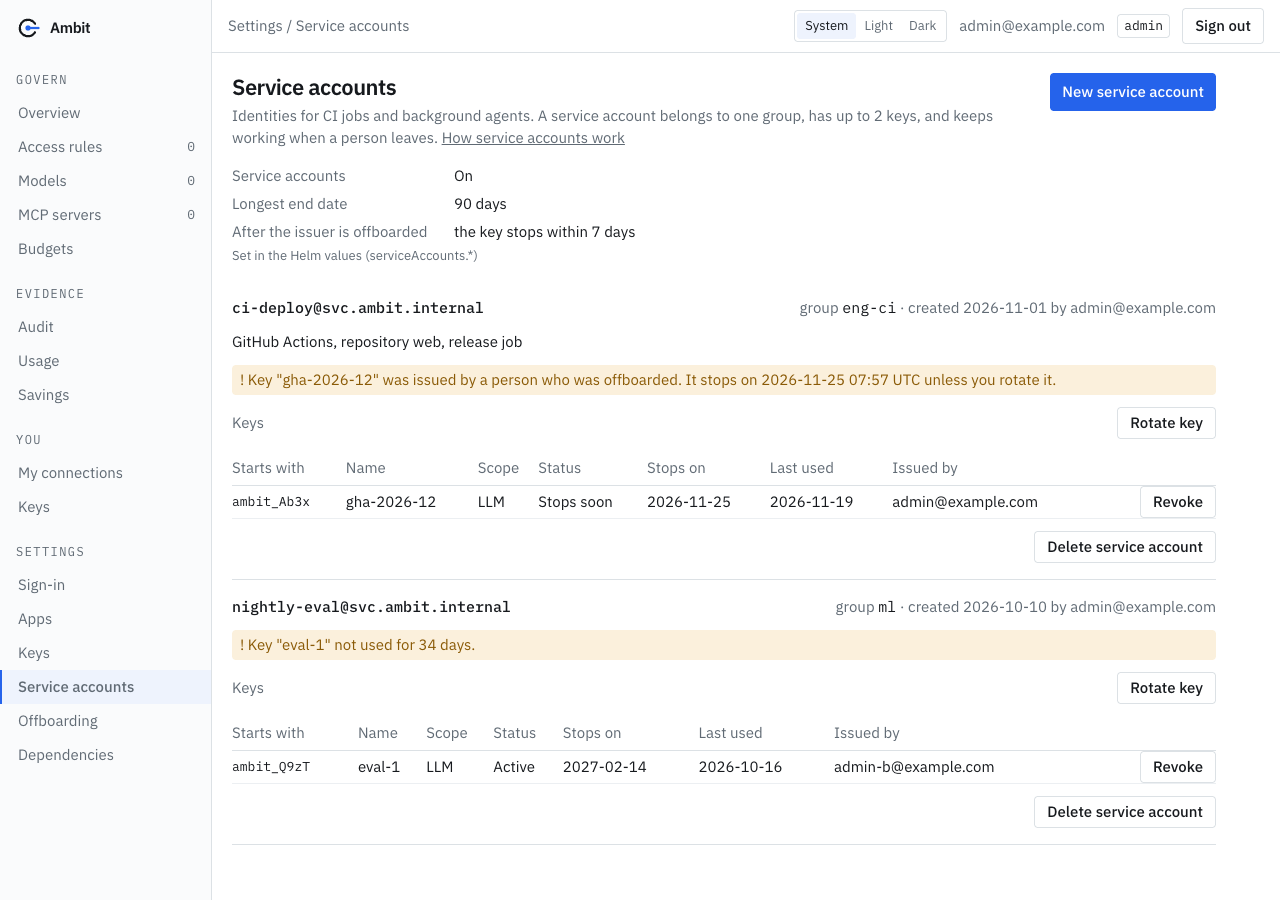
A service account is an identity for a program, not for a person: a CI job, a nightly evaluation, a background agent. It calls models and MCP tools as itself. Audit shows it, its group's budgets apply to it, and it keeps working when a person leaves the company.
Without a service account, a CI job borrows a person's personal API key. Then Audit names the wrong person, the job spends that person's budget, and the job stops when the person leaves or does not sign in to the console for 30 days.
What a service account is
- An identity of the form
<name>@svc.ambit.internal, for exampleci-deploy@svc.ambit.internal. The domain is reserved: the gateways refuse a token with such an email, the console refuses such a sign-in, and SCIM refuses such a user. Only a service account's key can carry it. - One group, chosen when the account is created, for example
eng-ci. The account gets what AccessRules and Budgets give that group or its identity. The group cannot change; to change it, create a new account. - Up to 2 keys. They are ordinary Ambit keys (
ambit_...), with an end date of at mostserviceAccounts.maxDays(default 90 days). They do not stop for inactivity: nobody signs in for a service account. - Only admins (members of
ambit-admins) create accounts, create keys and delete accounts. An admin sees the key once, when it is created. - Names are never reused. A deleted account keeps its name, so an AccessRule or an Audit search for
ci-deploy@svc.ambit.internalcan never start to mean another account.
A service account is not a Kubernetes ServiceAccount and has nothing to do with one.
Create an account and a key
- In the console, open Settings → Service accounts and choose New service account.
- Enter a name (lowercase letters, digits and
-, 1 to 40 characters). The page shows the identity as you type. - Enter the group. A group of its own, such as
eng-ci, is best (see Budgets). The console role groupsambit-adminsandambit-approversare not allowed. - Enter a description that says which job uses it, for example "GitHub Actions, repository web, release job".
- Choose New key: a key name, the scope (LLM, MCP or both) and the end date. The key is shown once, with the setup steps. Put it in the CI system's secret store now.
- Write an AccessRule that gives the group or the identity the models and tools the job needs (next section).
The same through the API (an admin's console session):
| Method and path | Body | Answer |
|---|---|---|
GET /api/admin/service-accounts | {settings, accounts: [{name, identity, group, description, created, createdBy, keys, warnings}]} | |
POST /api/admin/service-accounts | {name, group, description} | 201 {account} |
POST /api/admin/service-accounts/{name}/keys | {name, scope, days} | 201 {key, view, urls}; the key is in this answer only |
DELETE /api/admin/keys/{id} | 204: revoke one key (the same endpoint as for personal keys) | |
DELETE /api/admin/service-accounts/{name} | 204: delete every key, then the account | |
DELETE /api/keys/self | the key as Authorization: Bearer | 204: the key revokes itself, for example in a cleanup step |
Refusals: 400 bad input, 403 not an admin, 404 no such account, 409 service accounts switched off or the name was
used before, 429 too many accounts (200) or keys (2 per account, 10 creations per admin per hour), 503 with
Retry-After while a console restarts.
Use the key in CI
The key works like a personal key: in Authorization: Bearer <key> or in x-api-key.
GitHub Actions: add the key as a repository secret named AMBIT_API_KEY
(Settings → Secrets and variables → Actions), then in the workflow:
jobs:
  release-notes:
    runs-on: ubuntu-latest
    environment: release   # optional: an environment with required reviewers protects the secret
    env:
      OPENAI_BASE_URL: https://llm.example.com/v1
      OPENAI_API_KEY: ${{ secrets.AMBIT_API_KEY }}
      ANTHROPIC_BASE_URL: https://llm.example.com
      ANTHROPIC_API_KEY: ${{ secrets.AMBIT_API_KEY }}
GitLab CI: add a masked, protected CI/CD variable AMBIT_API_KEY, then:
release-notes:
  variables:
    OPENAI_BASE_URL: https://llm.example.com/v1
  script:
    - export OPENAI_API_KEY="$AMBIT_API_KEY"
    - ./generate-notes.sh
Other systems (Buildkite, Jenkins, CircleCI): store the key in the system's secret store and set the same
environment variables in the job. For MCP, send the key as Authorization: Bearer <key> to the MCP address.
The model name in a request is the provider's model name (for example gpt-4o-mini), as for people.
Rotate a key
An account has up to 2 keys so that you can rotate without a gap:
- Choose Rotate key on the account. The new key is shown once.
- Put the new key in the CI secret store.
- When the job uses the new key (its Last used date changes), choose Revoke the old key now, or revoke the old key in the key table.
Rotate before a key's end date, and at once when the admin who issued a key leaves (next sections).
How AccessRules apply
A service account is treated like one person whose only group is the account's group:
groups: [eng-ci]grants to every service account ineng-ci(and to the people ineng-ci).users: [ci-deploy@svc.ambit.internal]grants to that one account.allSignedIn: truedoes not grant service accounts. It means every person who signs in. A service account gets only what a rule names by its group or its identity, also when another rule for the same model or server saysallSignedIn: true.- The console roles
ambit-adminsandambit-approversgive a service account nothing: it never signs in to the console.
apiVersion: ambitproject.dev/v1alpha1
kind: AccessRule
metadata: { name: ci-release-notes }
spec:
  users: [ci-deploy@svc.ambit.internal]
  models: [gpt-4o-mini]
Only admins create accounts, so the group may be a name that no person has. If the identity provider later creates a group with that name, its members get the same rules.
Budgets
The account counts as one person of its group:
| Budget field | Effect on a service account in group eng-ci |
|---|---|
userRequestsPerDay, userDollarsPerDay, userRequestsPerMinute | apply to the account alone, with its own counter |
groupRequestsPerDay, groupDollarsPerDay, groupRequestsPerMinute | the account shares the group's counter with the people in the group |
A runaway job can use up its group's limit. If the account is in eng, a job in a loop can use eng's group
limit and refuse the people in eng for the rest of the minute or day. Give jobs a group of their own (eng-ci) with
its own Budget. MCP calls are not budgeted. See Budgets.
When people leave
| Who leaves | What happens to the account |
|---|---|
| A person in the account's group | Nothing. SCIM offboarding deletes that person's own keys only. |
| The admin who created the account, if they issued none of its live keys | Nothing. |
| The admin who issued a key (created it, and so saw it) | The exposure rule: that key stops within serviceAccounts.exposureDays (default 7 days) unless you rotate it. The account page shows "Issued by a person who was offboarded. It stops on |
| Every admin | The keys keep working until their end dates. Nobody can manage the account until a person in ambit-admins signs in. |
| The group is deleted in the identity provider | Ambit is not told (SCIM provisions users, not groups). The keys keep working until their end dates. |
Reactivating the person does not undo the exposure rule. An email change by SCIM counts as offboarding of the old
email for this rule. With exposureDays: 0 the key stops at once.
Unused keys
The account page warns about a key that was not used for 30 days ("not used for 34 days"). It needs the audit trail
(evidence.enabled). Nothing is revoked automatically: a release job may run once a quarter. The end date (at most
90 days by default) limits a forgotten key.
Delete an account
Choose Delete service account and confirm. Every key is refused within about a second (as for a revoked personal
key), then the account is marked deleted. The name stays taken. History records sa-delete-key for each key and
sa-delete for the account.
Threats, in plain words
- Anyone who can read the CI secret can use the key. In GitHub Actions, that is anyone who can change a workflow in the repository: they can print the secret or use it from their own computer until it is revoked or ends. Use a GitHub environment with required reviewers for wide access, and a group of its own with tight limits. Audit shows every call with the key ID, so you can see a key used at unusual times.
- A stolen key works until its end date (at most
serviceAccounts.maxDays) unless someone revokes it. Revoking or deleting stops it within about a second. - A person can use a service account to get more than their own limits. Group limits still cap the total; give the account a group with its own Budget.
- An admin who leaves keeps a copied key for up to 7 days (the exposure rule). Rotate at once when an admin leaves.
- A token from the identity provider with a
@svc.ambit.internalemail is refused by the gateways, by the console sign-in and by SCIM, so nobody can sign in as a service account. - Names are never reused, so an old AccessRule or Audit search cannot point at a new account.
What is not covered yet: workload identity federation (a CI job's own short-lived OIDC token instead of a stored key), limits by source address, and several groups per account.
Settings
Set these in the Helm values. They are shown read-only on the page, and a change is recorded in the History.
| Value | Default | Meaning |
|---|---|---|
serviceAccounts.enabled | true | false: the emergency stop for service accounts only. Creating accounts and keys answers 409. The gateways refuse every service account key after the next gateway update (a few seconds), also while the console is down. Keys are kept; switching back on restores the keys that have not ended. Revoking and deleting still work. When apiKeys.enabled is false, all keys are off anyway. |
serviceAccounts.maxDays | 90 | Longest end date of a service account key: 30, 90 or 365. Lowering it shortens existing keys for good. |
serviceAccounts.exposureDays | 7 | Days a key keeps working after the admin who issued it is offboarded: 0 to 30. 0 stops it at once. |
In GitOps mode, service accounts and their keys are written by the console directly, not through Git (a key cannot be in Git). What an account may use comes from AccessRules and Budgets, which go through pull requests as usual.
Without service accounts
When service accounts are switched off, or with Ambit before 0.5.0, a job has two other routes:
- A bot user in the identity provider with a personal key. Its keys stop after
apiKeys.inactivityDays(30) without a console sign-in, it needs an identity provider seat, and offboarding it is a manual task. - Client-credential tokens from the identity provider. They usually have no
emailclaim, so the gateways refuse them whilerequireEmail: true(the default). WithrequireEmail: false, offboarding cannot block them.
To move a job from a person's key: create the account and a key, put the key in the CI secret store, write the AccessRule, then revoke the person's key.
Out of scope in 0.5.0
Workload identity federation (GitHub Actions or GitLab OIDC tokens mapped to a service account), limits by source
address, manager groups and self-service creation, a ServiceIdentity CRD, several groups per account, editing an
account, per-person app connections (an MCP server with a connection answers "connect your account"), automatic
revoke of unused keys, alerts by email or chat, and budgets for MCP calls.